Best Practices
Giving Freelancers a Way
to Book Studio Space
Freelancer studio space booking, honestly: people outside your Google Workspace or Microsoft 365 can
Short answer: Freelancers outside your Google Workspace or Microsoft 365 account can't book your studios or rooms ahead of time themselves. Guests can't book your resources. The workable paths are: staff book on their behalf, a request form that staff act on, an account in your tenant for regular freelancers, or walk-up booking at a door display such as The Room Display.
Agencies and studios run on freelancers. Editors, retouchers, sound designers, photographers, motion artists. They need the edit suite, the studio or the booth, and they often know their schedule better than the staff who book for them. So the request comes up a lot: "can't we just let the freelancers book?" Here's the honest answer and what to do instead.
Why can't freelancers book ahead on their own?
Room and resource booking in Google Workspace and Microsoft 365 is built for people inside your organization. A resource calendar accepts bookings from your users. Outsiders don't see your resources and can't add them to an event.
That includes guest accounts. A freelancer you've added as a guest in Microsoft Teams, or shared a Google Drive folder with, can collaborate on files and join calls. They still can't book your room mailboxes or Google resources from their own calendar.
This is a sensible default. You don't want anyone with your studio's email address putting things on its calendar. But it means you need a deliberate path for freelancers, or they'll keep messaging whoever answered last time.
Five ways to give freelancers access
| Path | Freelancer can book ahead? | Effort for staff | Cost | Best for |
|---|---|---|---|---|
| Staff book on their behalf | No, staff do it | Medium | Free | Most studios |
| Request form, staff confirm | They request, staff book | Low to medium | Free | Busy studios with many freelancers |
| Shared booking account | Yes, through one shared login | Low | One user license | Small teams, with care |
| Account in your tenant | Yes, like staff | Low after setup | One license per person | Long-term freelancers |
| Walk-up at a door display | Only for right now | None | $99 once per door | Spontaneous sessions |
1. Staff book on their behalf
The producer or studio manager books the room and adds the freelancer to the invite by email. The freelancer gets a normal calendar invitation, and it shows up in their own calendar, whatever they use. This is the simplest and safest path. It's also how most studios already work, just informally.
2. A request form that staff act on
A short form with name, space, date, start and end time. Staff check the calendar and book. Google Forms or Microsoft Forms both work. I'm fond of this one: the first booking tool I ever built, back when I worked as a production technician, was a Google Form at a production company. A form gives freelancers a single place to ask, instead of five Slack DMs.
3. A shared booking account
Some small studios create one user account ("studio-bookings@") and share the login with regular freelancers. It works, but be clear about the cost: it's a paid user license, a shared password, and a weak record of who booked what. Your security team may not allow it. If you do it, rotate the password when freelancers leave.
4. An account in your tenant
For freelancers who work with you for months at a time, a regular account in your Google Workspace or Microsoft 365 is the cleanest option. They book like staff, and you control what they can book. It costs a user license per person, and you need to remove the account when the contract ends.
5. Walk-up booking at the door
If a freelancer is already in the building and the room is free, they can book it right there on a door display. No account, no login. More on that below.
How to set it up in 5 steps
- Pick the paths you'll support. Most studios combine 1, 2 and 5.
- Set booking permissions. Decide who on staff can book each space. I explain the Microsoft side in room mailbox permissions and delegation.
- Publish the request form. Put the link in your freelancer onboarding email.
- Write a one-page studio guide. Spaces, request form link, house rules, and "you can book at the door if it's free".
- Mount displays on the spaces freelancers use most. Usually edit suites, the studio, the booth.
What does walk-up booking cover, and what doesn't it?
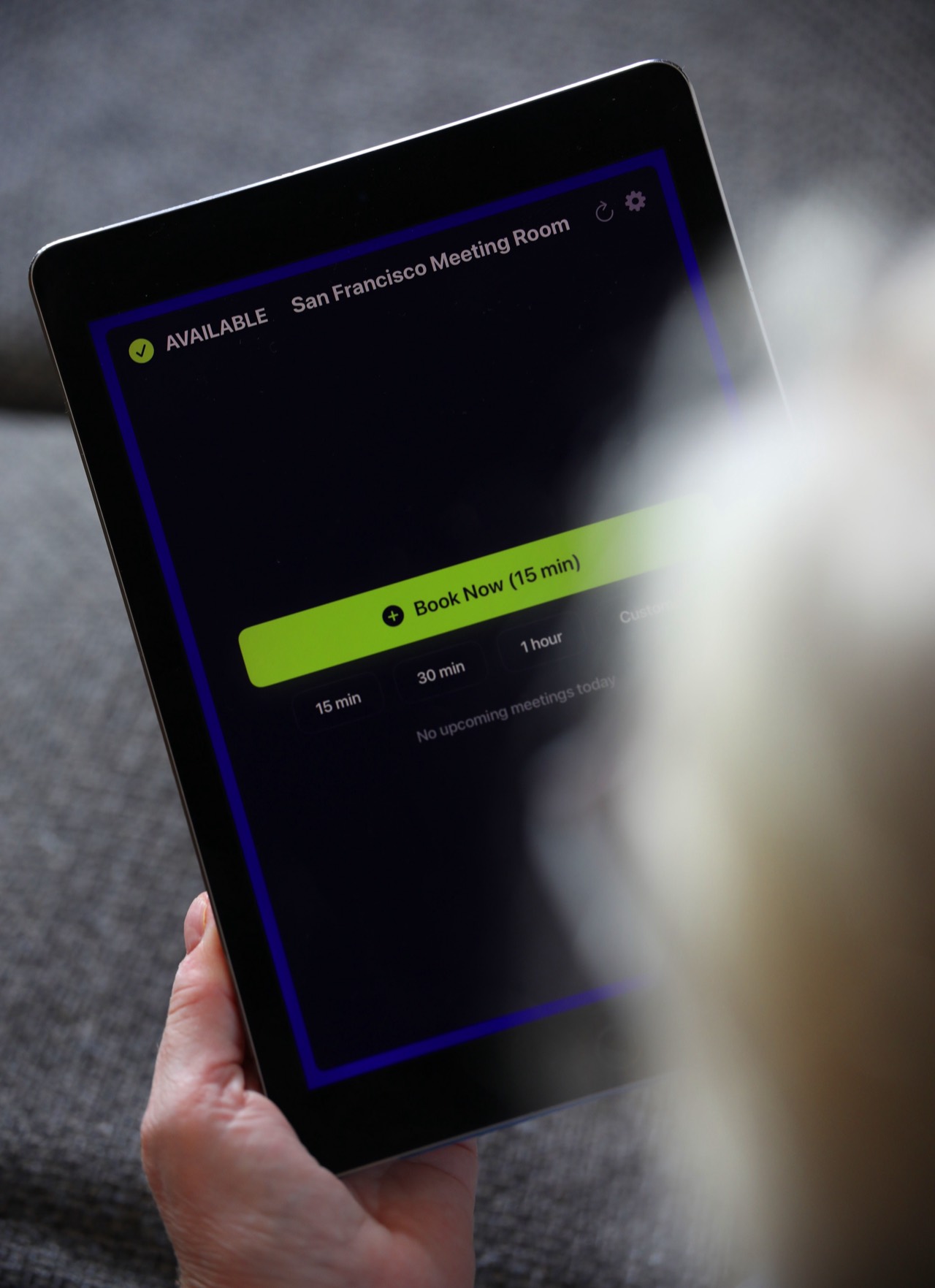
The Room Display is an iPad app that shows one room's calendar on the door. The colored ring is green when the room is free and red when it's in use, with the current booking, the organizer's name and the time left. It's a small piece of digital signage that also takes bookings.
Anyone standing at the display can book. There's no per-person login at the door. A freelancer who arrives early and finds Edit 2 free taps "Book Now (15 min)", or 15 minutes, 30 minutes, 1 hour or Custom (up to 4 hours 45 minutes). The booking is written to the room's calendar, so staff see it in Google Calendar or Outlook right away.
One tip: ask freelancers to use Custom and type their name as the title. The quick buttons create a booking called "Meeting Room Booking", and a walk-up booking isn't tied to the freelancer's name. It comes from the iPad, not from a personal calendar. A name in the title tells staff who's in there.
What walk-up booking doesn't cover: booking ahead. The display books from now. Tomorrow's session still goes through path 1, 2, 3 or 4.
Two safety details. A walk-up booking can be cancelled from the display within 5 minutes, in case of a mis-tap. Scheduled bookings can't be cancelled from the door at all, so a freelancer can't clear a producer's session by accident. I explain that choice in why you can't cancel a meeting from the hallway.
The app costs $99 per iPad, paid once. Dedicated panels typically cost $400 to $1,300 each plus $8 to $42 per room per month.
If your studio space is the hot spot, my post on booking the agency photo studio covers holds and build time.
When The Room Display isn't the right fit
- You need freelancers to book ahead without staff. The app doesn't add booking for people outside your calendar system. You need accounts, or a separate booking platform with public booking pages.
- You charge freelancers for studio time. No payments or invoicing.
- You need to know exactly who used the room. Walk-up bookings come from the iPad, not a personal account. Only the title says who it was, if they typed it.
- Your studio is open to the public. Anyone at the display can book. That's fine inside your building, less so in a public lobby.
Frequently asked questions
Can freelancers book our rooms in Google Calendar or Outlook?
Not from their own accounts. Google Workspace and Microsoft 365 resources can only be booked by users in your organization, and guest accounts don't change that. Staff can book on their behalf and invite them.
What's the easiest way to let freelancers request studio time?
A short request form that staff check and turn into bookings. Google Forms or Microsoft Forms both work, and freelancers get one place to ask.
Can a freelancer book a room at the door without an account?
Yes. Anyone standing at The Room Display can book the room for right now, for 15 minutes up to a custom length. The booking goes into the room's calendar.
Should we give long-term freelancers a company account?
For freelancers who are with you for months, often yes. They can book like staff. It costs a user license, and you must remove the account when they leave.
Related guides
- Walk-In Meetings: Why Tap-to-Book at the Door Changes How Rooms Get Used
- Who Can Book This Room? Room Mailbox Permissions and Delegation Explained
- Booking the Agency Photo Studio Without the Slack Chaos