Pricing
The Facilities Manager
Year-End Budget Guide: No New Renewals
How facilities managers can spend use-it-or-lose-it year-end budget on one-time buys that fix rooms and doors, without signing new renewals for 2027.
Short answer: Spend use-it-or-lose-it budget on things you own once they're installed: acoustic fixes, door signage, power at the door, furniture repairs, spare parts and room displays on a one-time license like The Room Display at $99 per iPad. Skip anything with a monthly or annual fee. A renewal turns this year's leftover money into next year's fixed cost.
Use-it-or-lose-it budget is money that disappears if you don't spend it before the fiscal year ends. In many organizations, an underspend also becomes next year's smaller allocation. So the pressure in November and December is real. The trick is to spend it on the building, not on new contracts.
Why are renewals the wrong way to spend leftover budget?
A subscription signed in December doesn't feel like much. One month, maybe two, lands in this year. Then the other ten or eleven months land in 2027, a budget you haven't been given yet, and the renewal after that lands in 2028.
Here's what that looks like with room panels on a subscription. Say you have 12 rooms at $20 per room per month. That's $240 a month, which looks small on a year-end request. It's also $2,880 every year after, before any price increase. You used one-off money to create a permanent line item, and next year you'll be the one defending it.
One-time buys don't do that. You pay, you install, you're done.
The one rule: if it renews, it waits
Use this table to sort your wish list. Anything in the last column marked "No" goes into the 2027 planning conversation, where it can be judged on its own merits.
| Item | Paid once? | Renews? | Buy with year-end money? |
|---|---|---|---|
| Acoustic panels for small rooms | Yes | No | Yes |
| Door signs and wayfinding | Yes | No | Yes |
| New outlet beside contested doors | Yes | No | Yes |
| Room displays on a one-time license | Yes | No | Yes |
| Replacement chairs, blinds, whiteboards | Yes | No | Yes |
| Room panels with a per-room subscription | Hardware only | Yes, monthly | No, plan it for 2027 |
| Occupancy sensors with a software platform | Hardware only | Usually yearly | No |
| Space management software | No | Yearly | No |
Five buys facilities can finish before the books close
1. Fix the rooms people avoid
Every office has a room nobody books unless they have to. It echoes, the blinds are broken, two chairs wobble, or the whiteboard is ghosted with last year's diagrams. Walk the floor and ask people which room they avoid and why. Acoustic panels, new blinds and a few chairs turn a dead room into usable capacity, which is cheaper than finding more space in 2027.
2. Put power where the screens will go
If you've ever wanted a screen beside a meeting room door, the blocker is usually power, not the screen. An electrician adding an outlet beside a door at eye height is a one-time job, and it makes every later decision easier. Ask for the outlet to sit behind where the mount will go, so no cable shows. I wrote about the options in how to keep a wall-mounted iPad charged 24/7.
3. Name and sign rooms the way people talk about them
"Room 3.114" means nothing to a new hire. "Harbor Room, seats 8" does. New door signs and simple floor wayfinding are cheap, permanent and make every booking question shorter. If your rooms are already in Google Workspace or Microsoft 365, make the calendar names match the signs on the wall.
4. Put a status display on the contested doors
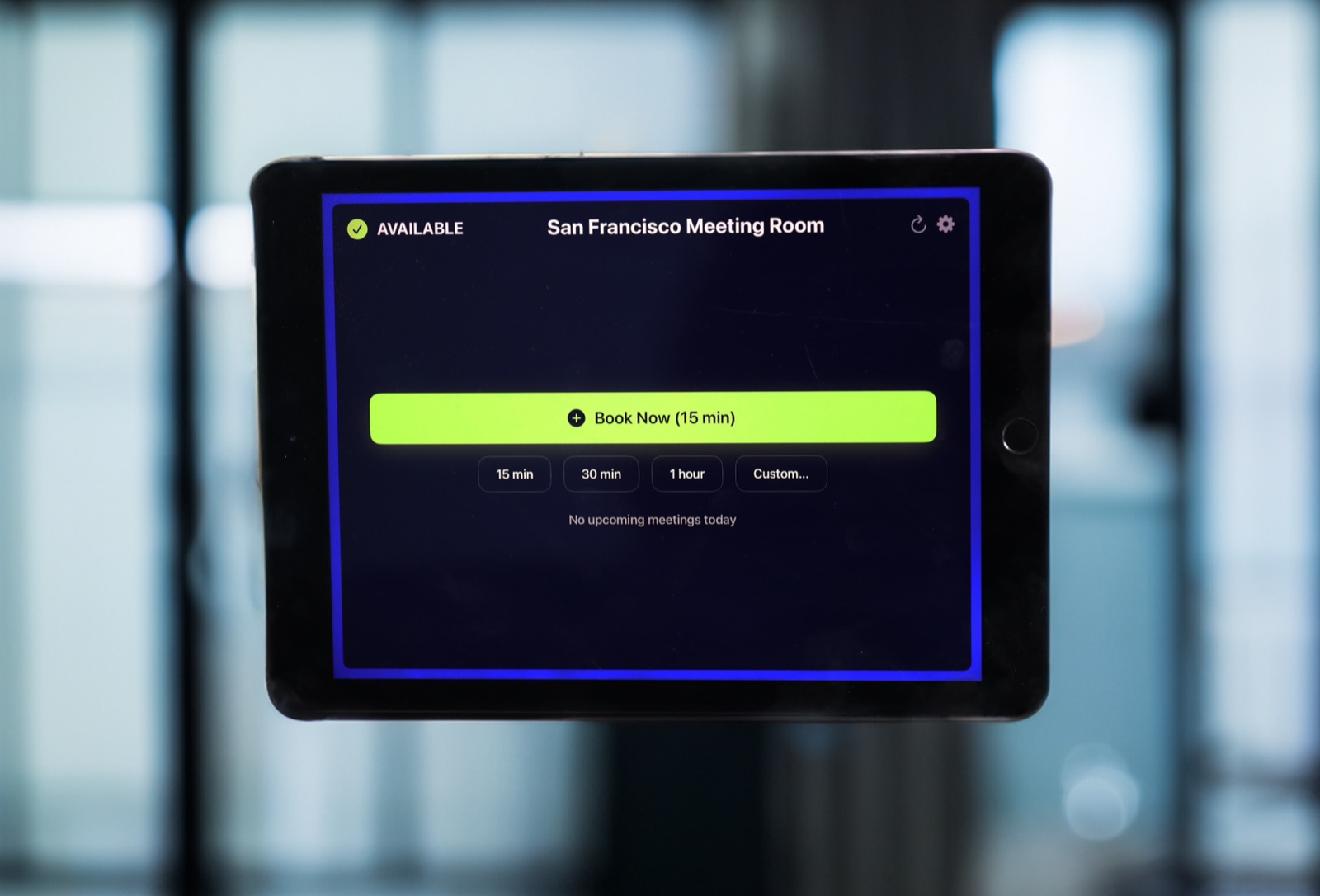
This is the one I sell, so I'll be upfront about that. The Room Display turns an iPad into a small piece of digital signage at the door. It shows whether the room is Available, In Use or Ending soon, with a colored ring you can read from down the hall. It also shows the current meeting, the organizer's name, the time left and what's booked next. Anyone standing at a free room can book it on the spot for 15 minutes, 30 minutes, an hour or a custom time.
For facilities, the useful part is check-in. Turn on Require Check-In and a booking nobody checks in to within 5, 10 or 15 minutes is released automatically. That's how the weekly meeting that stopped happening in October stops blocking the room every Tuesday. No sensors needed. More in meeting room check-in, explained. On Microsoft 365, check-in needs Direct Room Access, which an admin grants to the iPad's account.
It costs $99 per iPad, once. No subscription, lifetime updates included. Dedicated panels typically cost $500–$2,000 each plus $15–$30 per room per month. See pricing.
5. Stock spare parts
Door closers, chair casters, HDMI cables, light fittings, ceiling tiles, a spare mount. None of it is exciting. All of it means the next small failure gets fixed the same day instead of after a two-week order. Stock what breaks most often in your building, and label the shelf.
A worked example: $6,000 and eight contested rooms
Say you have $6,000 left and eight rooms that cause most of the booking complaints. These are rough numbers. Your quotes will differ.
| Line | Cost |
|---|---|
| 8 used iPads (around $150 each) | $1,200 |
| 8 app licenses at $99 | $792 |
| 8 wall mounts (around $60 each) | $480 |
| Electrician: 4 new outlets beside doors | $800–$1,200 |
| Acoustic panels for two phone rooms | $1,500 |
| Spare parts shelf | $500 |
| Total | $5,272–$5,672 |
Every line is paid once. In 2027 the cost is zero. The same eight rooms on subscription panels would start at $1,440–$2,880 a year in fees alone, on top of the hardware.
How to move fast without cutting corners
- Ask finance for the exact cutoff. Some count the order date, some the invoice date, some the delivery date. That decides what you can still buy in December.
- Pick projects you can finish in two or three weeks. Electricians and furniture can have lead times. App licenses don't.
- Raise one purchase order per project. "Room display kit for 8 rooms" is easier to approve than 24 separate lines.
- Bring IT in early. iPads need Wi-Fi, and IT may want them in your MDM. Businesses can buy app licenses in bulk through Apple Business Manager and IT can assign them to iPads, so no iPad needs its own Apple Account.
- Schedule installs for a quiet week. Late December is often the emptiest the office gets all year.
When The Room Display isn't the right fit
- You want one big screen in the lobby listing every room. One iPad shows one room's calendar. There's no overview screen.
- You need occupancy counts or utilization reports. The app has no sensors and no analytics dashboards.
- Your rooms aren't in Google Workspace or Microsoft 365. The display reads those calendars only.
- The door is outside, in a parking area or courtyard. iPads are indoor devices. Heat, cold, rain and theft will end them.
Frequently asked questions
What is use-it-or-lose-it budget?
It's budget that expires at the end of the fiscal year if you don't spend it. In many organizations an underspend also lowers next year's allocation, which is why departments rush to spend in November and December.
Can I prepay a subscription with year-end money?
Sometimes, but ask finance first. Many finance teams treat prepaid services differently from goods, and a prepaid year still renews into a new cost after that. A one-time purchase avoids both problems.
Can facilities buy room display apps without IT?
You can buy The Room Display on the App Store, but involve IT anyway. The iPads need Wi-Fi and a way to stay locked to the app, and IT may already have Apple Business Manager and an MDM set up for exactly this.
Do I need an electrician for a room display?
Only if there's no outlet near the door. A wall-mounted iPad needs constant power, and a hidden outlet behind the mount looks much better than a cable running down the wall.
Related guides
- The Hidden Renewal Traps in Room Booking Software Contracts
- Where to Mount a Meeting Room Display: Placement That Actually Works
- How to Pitch Meeting Room Displays to Your Boss (Copy-Paste Template Included)